Class News – Page 40 – Ms. Chan's Class Blog
 

Category: Class News

Dear students and parents,

This past week, students have continued to work diligently on their daily tasks in OneNote. Our Passion Project small group meetings were a great success! I felt so energized and excited for them after all of our meetings on Friday.

We have been working on developing our skills. Your child should now be able to (or with increasing independence):

  • log in to check daily assignments and complete with progressively less support unless it is a new concept
  • go back to yesterday’s Daily Activities to check for messages from me. If they did any work, there should be messages from me to read.
  • stay connected with classmates by contributing to our Collaboration Space daily and attending Zoom meetings
  • read independently for 20-30 minutes each day, and write a double-entry journal with increasing details that include thoughts and feelings
  • subtract up to 3-digits with regrouping and be familiar with navigating in IXL
  • get some physical activity every day
  • have a direction for what they will be working on for their Passion Project
  • send me an email if a question arises or something isn’t working

Digital Book Club

I originally mentioned that we will begin our Book Club meetings on Monday but I do not have everyone’s book selections yet so I will give people one more day. Our first meeting will be on Tuesday, May 5th instead. If your child made their selection, they will receive an invitation by tonight. Ask them to check their district Outlook Mail and click ACCEPT so I will know they will be attending. Thanks! Please click here to review the Book Club information.
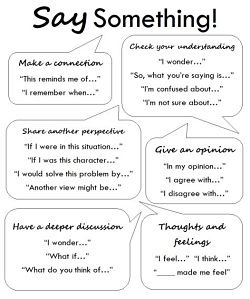
How to prepare for the Book Club meetings:

  • Students should have read at minimum the first chapter of their chosen book.
  • Review the Say Something strategy. They should be familiar with this because they have had many opportunities in class. They can also choose to share what they wrote for their double-entry journal for their reading response (found in Thursday or Friday’s page in OneNote).
  • Come prepared to “say something” to the group about a part of the story or a quote from the text and their reaction to it.

Here’s the schedule for Tuesday, May 5 on Zoom:

A Boy Named Bat Three on Three Chocolate Touch Mr. Popper’s Penguins
10:00 AM 10:30 AM 11:00 AM 1:00 PM

Here’s the schedule for Wednesday, May 6 on Zoom:

Danny’s Doodles @ 1:00 PM (to accommodate a classmate returning by plane on Tuesday)

Any questions? Please ask.


Something fun!

It has been five weeks since “returning” to school after spring break and I thought it is time for some extra fun… not that we weren’t having some elements of fun along the way! We will soon be diving further into how we continue to stay healthy – physically, mentally,  and emotionally. These are important elements of our health as we continue to stay at home to keep safe. So, I was inspired when I saw what the Physical and Health Education teachers at Argyle Secondary in North Vancouver created. It is a video that challenges their students to stay active. Enjoy watching! My friend is the one who is playing football in his backyard.

So, as a launch into our focus on healthy habits, I am asking students to videotape themselves doing some kind of physical challenge with a roll of toilet paper. They are welcome to copy something they saw in the video but this is a fantastic opportunity for their creativity to shine. I would LOVE to see what they come up with! Here are some videotaping hints:

  • ensure there is enough lighting
  • film outside
  • film in landscape mode and NOT vertically if you are using your phone
  • keep the video to less than 10 seconds

Feel free to include any family members including pets! I would love to share the finished video on YouTube but I understand if you have concerns so I will create two versions. I will not be posting any names. I will create a video that will be shared only in Stream, which is a private channel within O365. If there are enough of you who are comfortable with it being shared on YouTube, then I will proceed to make a second one. Note: There are creative ways to videotape so no faces are shown too. Video can be taken of the back of your child’s head, for example. When finished, please upload the video to their own OneDrive folder with their name in O365. Rename the file to include “toilet paper” in the title. Then send me an email to let me know it has been uploaded, please. If you wish for your child’s video to be included in the version that is uploaded to Stream only, our private channel, then please mention it in your email. Thank you for your participation. I am so looking forward to seeing what your child and you come up with! Feel free to make this a family project for extra time together! Have fun!


Appreciation

Thank you for your continued support at home. I will be going into school this week to pack up belongings that your child may be able to take advantage of like colouring pencils so we can do some art lessons at home. If you have not yet informed me what your child’s inside shoes look like yet, please send me an email. If you believe an umbrella was left at school too, please also include a description. I appreciate you all for working with me as partners at home. I am truly thankful. Please always feel free to email me. I am more than happy to answer any questions or address any concerns as we move forward. If you prefer a phone call, please let me know and I will call you instead of responding by email. We are supporting your child together!

With deep gratitude, Ms. Chan

Dear students and parents,

I miss you! Thank you for your continued time and effort spent on your learning at home. An absolute highlight every night is to review your daily tasks and write messages to you. Know that when I look at your work, hear your audio recordings, and especially watch your videos, I have a big smile on my face and my heart is warmed. It truly fills my bucket and my soul. Thank you for your hard work!

Last week, we had our very first class meeting on Zoom. Reading your feedback after our meeting touched my heart. I was thrilled to know that you all thought it was very nice to see everyone. Looks like you really enjoyed playing Zoom the Room. My secret agenda was to get you moving and doing some exercise too. Mission accomplished! I am so looking forward to our next Zoom meeting on Tuesday, April 28 at 11:00 AM. Please sign in a few minutes beforehand so we can get started shortly after 11. Thank you! Please check your Outlook email for the invitation and accept the invitation so I know you will be attending. Return to your email to find the link on Tuesday morning. See you again soon!

All Earth Day work submitted on time was shared at our digital online Celebration of Learning. Click here to view all projects. There were other submissions after the deadline so please go to OneNote to check those out under Collaboration Space > Class Ideas > Earth Day. Please feel free to add more compliments. Check it out!

In Math last week, we focussed on addition with regrouping. For grade 3’s, you will need to know how to add 3-digit with 3-digit numbers with regrouping (596+388 =    ) and grade 4’s will need to know how to add 4-digit with 4-digit numbers with regrouping (5967+3885 =     ). Students were asked to demonstrate this by creating their own equations. They were challenged to create larger and larger numbers to add. Then students were asked to record themselves teaching me how to add with regrouping. These were the highlights of the week. You make great math teachers! I saw some great cinematography too with camera movement and zoom in shots! Fancy! Thank you, parents, for helping! And thanks, Isaac, for the image. Next week, we will begin with subtraction facts and then move to regrouping.

On Friday, I asked for your reflections and self-assessment on your own learning in the past two weeks of learning at home. Thank you for taking the time to write. I really enjoyed reading your honest thoughts. I sense that there are parts of this learning at home that you like but the part you don’t like the most is that you don’t see your friends and that you miss coming to school. I’d like to remind you that you are all doing a good job of doing our part so that we can return to school sooner – thank you. I hope that our Zoom meeting will help with the feelings of missing each other. I understand it is not the same. I appreciate your feedback that you are enjoying the tasks that I have been giving you. Many of you expressed that you like the Collaboration Space because it feels like our Community Circle that we had every day so we will continue to use that. I’ve got more great ideas coming your way! If you have an idea too, please share! If you have not completed your reflections, please go to the Reflections section to fill out. I would love to hear from you too. Thank you!

We also started thinking about our Passion Project or a Genius Hour concept. Students were asked to go to the “I’m a self-learner” section to create a new page to record what they want to learn for “flexible learning”. What is it that you have always wanted to learn how to do or learn more about? Now that you have more time at home, what a fantastic opportunity to dive into those passions! My son has learned so many unique things at home on his very own that he would not have been taught at school like playing the melodica, card tricks, Japanese, stop motion short films, video editing, skateboarding, to name a few. Here’s your opportunity! The world is your oyster!  You will be recording what you wish to learn more about in our Collaboration Space on Tuesday so you will be able to see what others are interested in also. The learning could be the process and you can work on a final product at the end too! A couple samples were shared in OneNote that I will share here as well. Kiana recorded herself reading aloud and Zia researched zebras. Thanks for sharing! Enjoy!

PDF

Reminder: We have a Pro-D day on Monday, April 27. There will be no tasks posted in OneNote. Enjoy your day! I feel like I have learned a LOT lately but I absolutely love to learn so I will be doing more professional development!

Look out for more tasks on Tuesday! There won’t be a lot because your biggest task will be participating in our virtual class meeting. We will be sharing how we are feeling and something you did over the weekend so please come prepared. Thanks! Can’t wait to see you!

Did you notice that I added my Twitter feed on the right? Comments are always welcome on our blog. Click on Leave a Comment. It can be found right under the title of this post. Thank you!

Sincerely missing you,

Ms. Chan

Dear students and parents,

My sincerest hope is that you have continued to stay safe and healthy. We finished our first official week of remote learning with a variety of tasks. As mentioned in my email, the sections in OneNote have been streamlined to make it more efficient for both you, your child, and me. It’s a win-win! At any point, should you have any questions, please reach out by email. I will respond as quickly as I can and will call if that is your request.

If you have not responded to the mid-April check-in survey, please fill it out at your earliest convenience. I appreciate your time.

Just last Thursday, we were provided with information for us to use Zoom for classroom purposes. Since this is a new videoconferencing tool to us, it is important to review the expectations with your child and to remind them of what it means to be a good digital citizen. Click here to look at a poster provided by the District. Reviewing the poster will be one of our tasks for tomorrow so please login to O365 OneNote to look at the first task! Why tomorrow? Because on Tuesday, we will have our very first online class meeting on Zoom at 11:00 am! I know many of you have asked when this will happen but I needed to wait for more direction from our District first. Thank you for your patience. I am super excited to see everyone again soon. We will be playing a fun game called Zoom the Room!

We are constantly evolving with our program of learning at home. As such, resources are quickly being created and made available to us. I wanted to highlight a few things here to bring it to your attention:

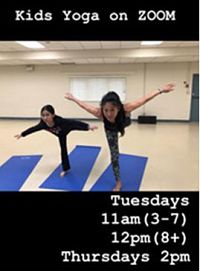
  • Ms. Vivien, our yoga instructor, and a Brentwood parent, has so kindly and generously offered FREE yoga sessions over Zoom every Tuesday at 11 am (ages 8+) and every Thursday at 2 pm (all ages). Yoga sessions will run approximately 30-40 minutes. To signup, families must email her at  vgomes@me.com. Please provide the following details:  parent’s email address, number of children, their ages, and division number.
  • Mr. Maroney, our music teacher extraordinaire, has created a blog for students to continue their learning at home. Click here to go to his blog. We appreciate all the work that went into it. I added a link to his blog under School Links.
  • Ms. Delvecchio has been busy updating our school website. We now have a section called Continuous Learning. I have added a link under School Links. Click on Student Resources to find links to books online or if you have a question you want to ask Ms. Delvecchio, click here to do so! She is waiting to connect with you!

I am deeply grateful for your continued support at home. I appreciate your time and effort in helping your child. It is my hope that they will become more independent and require less of your support over time. As these are new tools to them (and there will be more!), they may find themselves feeling frustrated at times. Remind them of my first message to them: This is the perfect opportunity to practice our growth mindset with a positive attitude, stop to do some breathing exercises, practice perseverance and say to themselves, “I can do this” or “I can’t do this… YET” and use their critical thinking skills to approach the issue. There is something of value to be learned through the struggle. I know my own kids at home really don’t like it when I don’t come to their rescue right away but I want them to learn how to self-regulate and practice the skills I just mentioned above. I remind them, “The more I help you, the more I’m not helping you.” Of course, it always depends on the situation as I always gauge what they can and cannot handle. We know our own child best… well, on most days, at least!

I hope you can really feel in your heart that I am here to support you and your family during this time and that I am working hard to stay connected with your child especially through OneNote and email. Please reach out if you need anything.

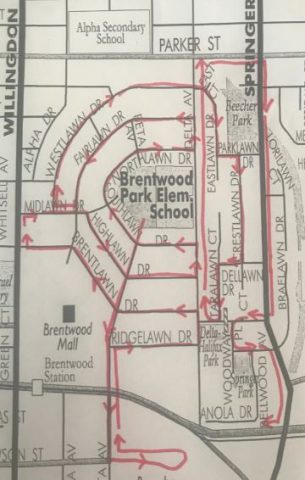
I am so looking forward to seeing you during our car parade tomorrow at 1:45pm! Here is the map of the route. Click here for more details.

Sincerely, Ms. Chan

Dear students and parents, (Please ask your child to read this post and future posts or read it together. Thank you!)

I hope you have all continued to stayed healthy and enjoyed the Easter weekend. I have enjoyed my extra time at home with my family. We enjoy cooking and baking together. I haven’t gone shopping, hence no Easter eggs, so I hid some chocolate hearts (from Valentine’s Day) around the house for my teenage kids to find. They loved it!


Last week, I asked you to participate in our guessing game to tell me how many retakes I did to create the video. Thanks for the guesses! Answer: 95! Yes, I was filming for over an hour and a half outside but I got some great sunshine and fresh air. It surely gave me a glimpse into the acting and producing world! Eva had the closest guess at 102 so she will be our first “guest”. Eva, I’ll reach out to you soon.

Thank you to everyone who completed their first assignment last week – to send me an email. I thoroughly enjoyed reading them! If you haven’t completed it yet, it’s never too late. Take a look at last week’s blog post for the details. I encourage you to use your O365 Outlook Mail.


OFFICE 365 & DAILY TASKS

As we move forward with our official launch of remote learning using OneNote in Office 365 as our primary platform, there are a few things I wanted to mention:

  • New daily activities will be available on OneNote each morning. There will be a core amount of assignments but I will also offer choice and challenges. Your child will have a few opportunities to dive in further into the learning. The option to be creative to come up with their own challenges based on the activities or assignments too is always there! This will make their learning real and authentic if it is something that sparks an idea for themselves. Ultimately, that’s what we want… to encourage them to be lifelong learners and to dive in to their own interests.
  • When students log in to O365, this should provide access to all of their applications: Word, OneNote, Outlook Mail, etc. To move from one app to another, simply look for the “waffle” at the top left-hand corner (looks like a 3 x 3 array). If your child is primarily working on an iPad or tablet, they will need to download each app separately unless they are using the web version. I believe it works better on Chrome rather than Safari.
  • Any students logging in today to check OneNote will not see anything yet because I will be activating it later tonight so it’s not visible just yet.
  • NEW: Grade 3’s now have full access to Outlook Mail so their email address is their pupilnumber@edu.burnabyschools.ca. For documentation on O365 How To’s, click here.
  • It will take some time to become proficient with using O365. This is where we will need to practice the 3 P’s of having a growth mindset: patience and perseverance with a positive attitude. The activities this week will attempt to help build your understanding of the tools available. If you have questions, please reach out to ask. I have been supporting colleagues with the use of O365 so I am proficient and can walk you through any difficulties you may have.
  • There will be a mix of online and offline (unplugged) work. Please know that if no device is available or if you and your child would prefer to complete the assignments on paper and take a picture to upload to their page instead, that is welcome too. I am mindful of screen time. If you are interested, click on link to read an article about Should I Feel Guilty About All the Screen Time?
  • The daily tasks will be available for your child to complete and it will be more than enough for the day. I don’t want it to be overwhelming so if it is, pick and choose what is manageable. The beauty of this is that your child can easily return to a previous day’s tasks to continue working. The loose “due date” will be to have the tasks completed by the end of the week on Friday partially because I will have more time on the weekend to review. I deeply appreciate how you will be supporting your child’s learning and fully understand that completing all of the tasks may not be desirable. After speaking to each of you, I know that every home is in a different situation. Please do not stress. If it is not done, perhaps return to it at a later point. This work is not meant to be an extra hardship that will negatively affect your relationships. In this time of pandemic crisis, taking care of your mental, emotional, and social well-being is more important than academics for now. Please do not hesitate to contact me about any of the work. I will be sending a short survey at the end of next week to check-in to see how things are going for you. I will adapt the daily tasks depending on the feedback I receive for the following week.
  • If your child does not know their pupil number or password to login to O365, please send me an email right away and I will send. To login, they need to type: pupil#@edu.burnabyschools.ca

SCHEDULE

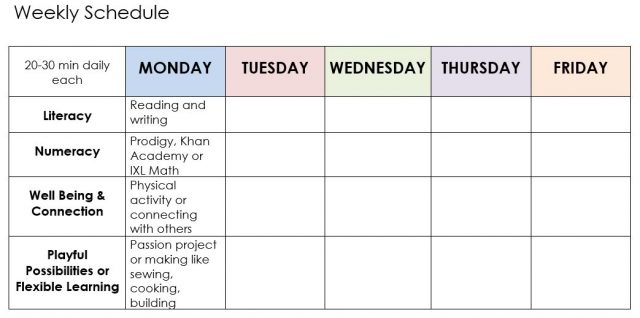
We are aiming for a balance of learning at home every day. As a guideline, this should include approximately 20 minutes (recommended for grade 3’s) to 30 minutes (recommended for grade 4’s) daily on literacy (reading and writing), Math, well-being & connection (physical activity to raise heart rate or yoga and connecting with family/friends), and playful possibilities or flexible learning (where you can exercise your creative and critical thinking like a passion project on researching zebras or drawing, painting, building, coding on Tynker, or learning a new skill, for example).


ONLINE WEBSITES

Since we have been asked to stay safe at home, there have been countless paid websites that have offered free licenses to otherwise paid sites. I believe in offering choice so I have signed up for different reading and Math sites – all will be new to your children except for Prodigy. Each one offers something slightly different. I highly recommend you take some time to check these programs out to figure out which one will best suit your child’s learning. All of the passwords will be available on OneNote tomorrow morning. If you really want them today, please send me an email and I will forward your passwords today.

MATH & ENGLISH (based on BC curriculum):

Review of Math and English are skills-based questions. To login, click here.

“Gain fluency and confidence in math! IXL helps students master essential skills at their own pace through fun and interactive questions, built in support and motivating awards. From phonics and reading comprehension to writing strategies and more, IXL helps learners develop the communication skills needed for success in school.”

What I like about IXL is that it is based on our BC curriculum.

READING:

This is a levelled online reading program. All students have their own account. To login, click here. You can always find the link on the right-hand sidebar under Links. Click on your child’s initials and enter password. I would highly recommend this program because these books are levelled with related comprehension questions. Since this is a US-based program, please let me know if I have placed your child at a level that does not match their current level. I can easily bump them up or down levels. I also like this program because there is an option to record their reading for any book so I can listen to them read. I have purposely placed them at a slightly lower level so that they can become familiar with the program first.

Once logged in to Raz-Kids, your child also has access to Headsprout, which is related program that supports reading comprehension.

We have access to over 40,000 books online: Epic! Books. You have been sent an invitation by email. Just click to sign up and accept! I love this digital library because there are so many high interest books here like ones you can borrow from the library – fiction and non-fiction, videos, read-to-me books, and audiobooks in many genres. It feels limitless! Our class code is: mcj0307

“A kid-safe, ad-free streaming library of read-aloud animated storybooks.” Click here for parent resources. What I love about Vooks is how the books are animated and there are a lot of books to choose from. Parents can get one month access for free – click here.

MATH:

Prodigy is a game-based math practice website that adapts questions to match the skill level of each player. To login, click here.

 

“What is Khan Academy? We offer exercises, quizzes, and tests so students can practice and master skills, as well as instructional videos to help students learn or review material.” To login, click here. Your child has been placed in their appropriate grade level. If you would like the grade level to be changed, higher or lower, please ask. To learn more, click here.

To login to these sites, your child can access all of the links, username, and password when they login to O365 > OneNote. Click on to their name and go to the section named :

and then look at the page named: . You will find all of the login information here.


Thank you deeply for your support at home! I can’t do this without you!

Sincerely, Ms. Chan

Ms. Chan's Class Blog ©2026. All Rights Reserved.
Powered by WordPress. Theme by Phoenix Web Solutions