Digital Artifact – Internet Safety and Digital Citizenship
As teacher-librarians we have a responsibility to be educators that embrace and consider the needs of the whole school community. The Canadian Library Association defines “school libraries as a force for improving teaching and learning, it is designed to engineer and drive future-oriented learning and teaching throughout the entire school” (CLA 5). It was important for me to contemplate a cumulative project and create an amassed digital artifact that would touch the entire school community of learners. It needed to be dynamic, inviting and engaging for students, relevant to the curriculum and connected to the core competencies for teachers, and informative and helpful for the parent community.
In keeping with my chosen area of focus from part A and part B of this long range assignment, the cumulative digital artifact that I have created is a collection of resources around the topic of internet safety and digital citizenship, compiled and arranged using the Symbaloo platform. I chose to create this project for grade 3/4 elementary school students in order to stretch myself into serving both the primary and intermediate grades and also in a conscious effort to initiate the teaching of these skills earlier than the usual upper intermediate/preteen years. A link to my digital artifact is below.
Rationale
We are not only tasked with educating students on how to use technology in education but also to ensure they use these resources respectfully, appropriately, and safely. As students gain access to the internet for research, engage with digital platforms for class communication, and utilize personal devices for projects, there are potential concerns such as online etiquette, cyberbullying, online predators, identity theft, misinformation, and other complexities that can arise with increased online activity. Elementary school children are in a crucial stage of development and it is essential to start teaching these skills early, before the adolescent brain undergoes significant changes that shape behaviour, decision-making, and emotional responses. This early education will aim to instil skills in the students that will hopefully become lifelong habits.
In modern education, we recognize that future-oriented learning involves technology. The CLA reminds us that “technology supports the construction of new understandings by the learner, not just the learner passively consuming information” (CLA 5). Teaching with a variety of digital resources aligns with our commitment to forward-looking education and relates to our students’ technology usage in the practical world. The concept of the ‘whole’ school community goes beyond just the students’ educational experiences to encompass their interactions at home with their families. The ‘entire’ school community must also include educators that collaboratively learn and share together in order to evolve their teaching practice. Research has shown that “technological tools are used to improve understanding, improve academic achievement and knowledge comprehension, improve learning gains through motivation, attention and satisfaction towards learning itself” (Crompton). Teaching with a variety of digital resources aligns with our commitment to forward-looking education and relates directly to our students’, parents’, and teachers’ daily experiences in the practical world.
This project also supports the BC Curriculum. The BC Curriculum outlines, as a component of Career Education 4, for students to “recognize the intersection of their personal and public digital identities and the potential for both positive and negative consequences” (BC Curriculum). The Ministry of Education defines digital literacy as “the interest, attitude and ability of individuals to appropriately use digital technology and communication tools to access, manage, integrate, analyze and evaluate information, construct new knowledge, create and communicate with others” (Government of British Columbia). The teachings and learning in this digital artifact directly support BC’s Digital Literacy Framework most notably in the area of digital citizenship, internet safety, privacy and security, cyberbullying, digital footprint and reputation, self image and identity and having a balanced attitude towards technology.
The Burnaby School District, where I currently teach, also has policies and procedures around curriculum and resource development. When selecting my digital resources it was important to me that I follow policy #6.55 of the Burnaby School District regarding the Selection of Learning Resources seen here. My choices would need to:
1. support and enrich the curriculum while considering the varied interests, abilities, learning styles, and maturity levels of students
2. stimulate an interest in acquiring, testing, and applying knowledge
3. present various aspects of controversial issues so that students may have an opportunity to develop, under guidance, the skills of critical analysis as a basis for making informed judgements
(Burnaby School District Policy #6.55 1)
This policy states that “recommendations from curriculum specialists shall be sought where possible” (Burnaby School District Policy #6.55 2) and so I also referred to the district’s brand new Education Technology Plan to ensure my resources would address the curricular competencies outlined. In particular the competencies focused on are highlighted below.
Burnaby School District EdTech Plan, Grade 4-7 digital citizenship and internet safety competences:
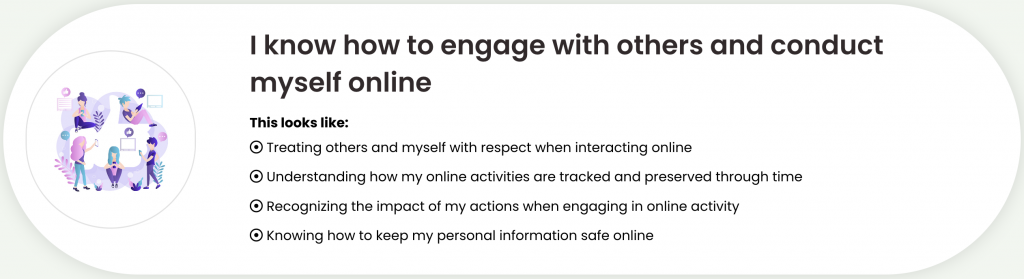
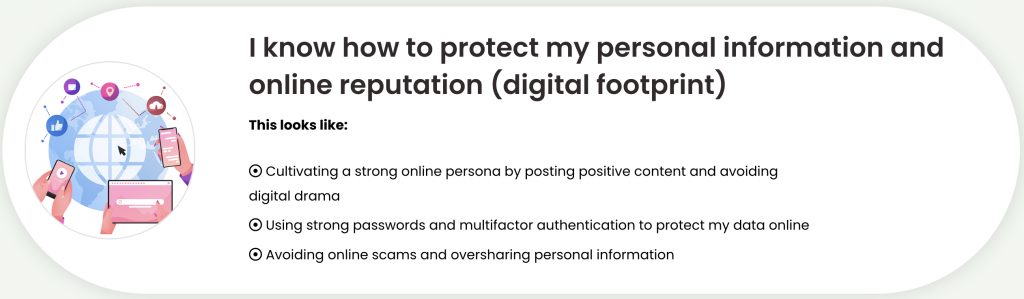
(Images retrieved from, Burnaby Board of Education. Burnaby Schools Education Technology Plan. Burnaby Board of Education, https://edtechplan.burnabyschools.ca/. Accessed 20 June 2024.)
Burnaby School District EdTech Plan, Primary grades digital citizenship and internet safety competences:

(Images retrieved from, Burnaby Board of Education. Burnaby Schools Education Technology Plan. Burnaby Board of Education, https://edtechplan.burnabyschools.ca/. Accessed 20 June 2024.)
The International Society for Technology in Education emphasizes the role of educators in preparing students to engage responsibly in the digital world. The ISTE Standards for Educators considers “preparing students to contribute positively to the digital world and behave responsibly” (ISTE, Citizen Standard 2.3) helping students become good digital citizens during the process. Equally important to me in this project, was to not lose focus on the students’ development of their core competencies. ISTE standards also outline cognitive factors (eg. critical thinking ability, communication ability, autonomous judgment ability and rational decision-making ability), emotional factors (eg. human dignity, tolerance, community consciousness, responsibility and care), and behavioural factors (eg. active participation, autonomous regulation, compliance with laws and regulations). These core competencies are vital to learning and are reflected in the student feedback form that I have created at the bottom of the Symbaloo page to accompany the learning. This will be acknowledged in more detail when discussing the processes of the sharing and feedback of the digital artifact.
Key Features
When considering key features for my artifact, I wanted to ensure that it would foster learners’ excitement and engagement. I was inspired by the ISTE’s experimental study of a group of students who learned through visual learning and a game-based environment as opposed to a traditional lessons. The findings revealed that “the experimental group achieved significantly better scores on digital citizenship than the control group” and “the experiment led to decreased concerns about online harassment, victimization, and perpetration behaviours as students had increased levels of understanding of how to avoid and safely navigate those negative situations and practice good behaviour in a safe environment” (Crompton). The ISTE acknowledges that “technological tools are used to: improve understanding, improve academic achievement and knowledge comprehension, improve learning gains through motivation, attention and satisfaction towards learning itself” (ISTE). My goal and pedagogy was to keep the learning hands-on, engaging. interactive and exciting, while remaining student-centred and providing student-led opportunities. Therefore, a key featured section of the Symbaloo compilation consists of nine engaging interactive games for students to choose from that will both hold their attention and build their skills when learning.
In my search for further interactive activities, I needed to consider the needs of the learners in my school, the grade level of the students I was trying to reach, and the specific curriculum content for that grade levels mentioned above. Having previously taught a grade 3/4 classroom myself, I knew that internet safety was a key component of the Canadian Centre for Child Protection’s national safety education program Kids in the Know, as this program aims to “help build skills that increase their personal safety and reduce their risk of victimization online and off” (Canadian Centre for Child Protection). Reviewing this document and program, was very useful in reminding me of the kinds of digital safety and citizenship lessons learned at this age level and what kinds of digital activities might be suitable to add to my Symbaloo curation.
I was especially motivated to include short video presentations when viewing the MediaSmarts website. The MediaSmarts website defines digital citizenship as, “the ability to navigate our digital environments in a way that’s safe and responsible and to actively and respectfully engage in these spaces” (MediaSmarts). MediaSmarts further defines what it means to be a responsible digital citizen in four categories: Empathy and Community, Positive Technology Use, Sharing Information and Ethics and Privacy. The section of video presentations in the Symbaloo curation of resources is meant to explore these areas of online safety, personal data (your digital footprint), sharing of information and proper online etiquette, at age appropriate levels and activities for grade three and four students. The video presentation, “Empathy and Community: What does it mean to be a digital citizen?” (MediaSmarts) was a good example for me to follow. This video encourages viewers to understand that digital citizenship involves empathy, community, and the awareness that there are real people on the other end of your messages. It also emphasizes the importance of listening to your body and taking a break before responding. However, what stood out to me most was that I noticed that the video was a short and active presentation that used colourful cartoon images to engage the viewer. This would be appealing to children.
Next, I chose to include a section of interactive digital quizzes to engage the students minds even further. These fun quizzes capture the students’ attention and maintain their interest while making learning more enjoyable. This is because with digital quizzes the students often interact with multimedia elements such as videos, animations, and interactive graphics, which can enhance their understanding and retention of information. Many digital quizzes incorporate elements such as points, badges, and leaderboards, which can also motivate students and make the learning more competitive and satisfying. Perhaps the best part of digital quizzes is that they provide instant feedback to students, allowing them to quickly assess their understanding and identify areas where they may need improvement. Therefore, a third key feature of my Symbaloo compilation are the nine student-centred quizzes arranged to cover the grade 3/4 curriculum content for internet safety and digital citizenship.
Student-led choice was important to me. “Offering these differentiated, multidisciplinary approaches to learning (all on one platform) meant providing pathways for all students to explore and learn based on strengths and interests” (CLA 6). I desired a single interface that allowed students to be able to click and choose their own learning while providing them with variety in order to offer equal opportunities for achievement to all students. I wanted to use a technology tool that supported providing flexibility for students to learn at their own pace and convenience. In consideration of the teacher-librarian’s role in building participatory learning, I also sought to ensure that for this digital project “playing to learn” (CLA 5) was provided.
I found the Symbaloo platform to be an efficient and succinct tool to organize video content, games, quizzes, lessons and resources in an easily accessible way for students, parents and teachers. I appreciated that the site allowed for distinct, brightly coloured sections to clearly separate items into categories and that each category is clearly labelled when the user’s cursor is hovered over it. Inside each of these coloured sections, the icons are also visually appealing with clear titles on each one as to what it provides access to when clicked. In regards to user-friendliness, I appreciate the picture icons on the tiles as they are a quick and handy visual reference for beginner readers, ELL students and visual learners to see and know where to click. The interface is easily readable and the small clickable tiles meant that a lot of information and many activities could be presented on one page, seen at a single glance. This was especially good for parent and teacher information, as it provided transparency for staff and families to view their own resources but also easily access what the students were learning. Often parents are given supportive information separate from what their children are studying. The Symbaloo platform allows for easy access by parents to their own section of helpful tools and also allows them to see, explore and understand their child’s learning. An important necessity when we are encouraging parents to have conversations with their children about these topics. Therefore, two more key features of the digital artifact compilation are the easily accessible parent and teacher resources.
Another thing that I appreciated about curating the resources using the Symbaloo platform was that that the links could be refined to connect specifically to what would be attended to from the websites (videos, interactive games, quizzes, documents etc.) and not just the website itself. The link leads directly to the resource itself and the full site does not have to be navigated. Because each link is able to open up inside of Symbaloo, the user is not redirected outside of the platfrom (for example to the YouTube site) where advertisements are more likely to interrupt the interactive learning.
One minor thing I did find frustrating with Symbaloo though, was the fact that I couldn’t title my curated page using more than thirty letters. I had wanted to title it “3/4 Internet Safety & Digital Citizenship” however I could only title it “3/4 Internet Safety” as this was all of the letters that would fit in the allowable title space given. This title doesn’t accurately represent this curated compilation. I realize that I could create another tab at the top and move digital citizenship links to a separate page while keeping the internet safety links on the first page. However, as previously noted, what I liked about the Symbaloo tool was that everything was found on one interface, seen at one glance. This meant one less navigation step for kids, parents and teachers. I appreciated that everything could be located on one page, organized by colour coding and didn’t involve flipping back and forth between pages. This was a minor issue though, and Symbaloo proved to be an advantageous tool to use to compile and curate valuable resources for easy access for learners.
It is my hope that this organized collection provides quick and accessible resources for teachers, students and parents to help in educating and fostering digital and media savvy citizens. It is vital to recognize that this is a working digital collection that can be edited, added to, culled from and changed to reflect how quickly and frequently our digital world is evolving. With the rate of changing technology in our world, having a non-static artifact is essential to providing something that can be built upon, evolve and grow over time.
Plan for Sharing and Feedback
My plan for sharing this digital artifact would first be to provide a preview during a lunch-and-learn for any interested staff at this grade level. Staff meeting time is coveted and tight, and considering this project has a targeted audience it may be best to meet with this intended group separately. I would begin by providing a solid rationale and light snacks. I would highlight the areas of the curriculum that will be covered, explain how diverse students needs are considered and that core competencies will be nourished. I would encourage collaboration by offering my responsibility to organize and prepare the digital devices, by drawing attention to the self-led nature of the teaching and explaining that assessment will be shared. I would follow up this meeting by emailing interested staff a link to the digital artifact itself, so that they could peruse the content more thoroughly. I would highlight the ‘yellow’ teacher resources section, encouraging them to look over the prepared materials in order to ignite enthusiasm and interest. Once a collaboration was established, I would inform the parent community of that classroom (through a classroom email) regarding the learning about to take place. I would invite guardians to explore the ‘green’ parent resources section and have meaningful conversations with their children about the learning.
I have included a ‘purple’ section in the Symbaloo digital artifact for students, parents and teachers to freely give feedback. I have created a separate Google form for each group that is easily fillable and quick to complete. The student form is a bit more lengthy and may need teacher facilitation with the class to complete. There are ten questions given to students that focus on core competency development with opportunities given for general feedback as well. There is also a ‘lettered’ section to deliver responses regarding the ease and use of the digital platform and tools. Responses include a sliding scale of growth, with picture icons to assist visual learners. The parent and teacher feedback forms are considerably shorter, with only five questions each, as anything lengthier may seem too laborious to complete. I would suggest that feedback can be provided from parents and teachers on these forms at anytime during the learning in case pertinent questions or concerns arise. For students however, I would consider completing this as a cumulative activity (overseen and facilitated by the teacher-librarian for clear comprehension) due to their young age and varying abilities. My hope is that by providing open opportunities for feedback that “progress focuses on growth and is expressed in terms of growth, expressing strengths and areas of need” (CSL 18).
It is my sincere desire that using this digital artifact will reinforce that the library learning commons is place where “learning literacies and technology competencies evolve, and critical thinking, creativity, innovation and playing to learn are nourished” (CLA 5). In the future, this digital artifact could be broadened by adding new tabs and pages that have interactive resources for internet safety and digital citizenship aimed at different grade levels. The content on the interface that I have already completed may need to be weeded as digital learning changes at rapid pace and the need to remain current is necessary. This digital learning should also be expanded to include live conversations and social interactions where responses and connections are made to each other and also physical literature, storybooks and resources as well. The focus for this assignment was to incorporate educational technology in a meaningful way for student, parent and teacher learning but this should not negate the requirement for human connection and interaction. This digital artifact should remain fluid and flexible as “all schools…need to provide access to teaching expertise in the library as well as best resources, technologies and physical and virtual learning spaces to support learner needs as they evolve” (CSL 5).
Reflection
As this course comes to a close it has been remarkable to go back and reflect on the last six weeks of learning. During the first few weeks of this course I was grateful for the part A and part B assignments that allowed me to explore my own chosen area of inquiry and interest in educational technology in preparation for the final assignment. This guided approach to completing these initial assignments gave focus to the final assignment topic very early on, so that research could be continued during the weeks that followed.
My approach was to explore more academic research initially (supportive journal articles, TED talks, BC curriculum, district policies, plans and resources) to make sure that my chosen area of interest was supported educationally through research. This helped me develop a strong rationale for the project. During the latter three weeks, my approach to the assignment became more practical in application where I did a lot of Google searching, bookmarking and exploring digital resources to accompany the curricular standards that were discovered in the weeks previous. I did appreciate that the Canadian School Libraries Foundations for School Library Learning Commons in Canada: A Framework for Success document and the ISTE Standards document were included in the first readings assigned in this course as these were very helpful during the practical searches to ensure that activities being bookmarked were meeting and correlating with standards set out by reputable organizations.
I explored two digital platforms as my presentation tool for the final assignment, Padlet and Symbaloo.) Although both were suitable, I found Symbaloo more easy to navigate and clear to add, remove and edit content. I did however, learn some new features of Padlet through others in this course and I would like to try this platform for future assignments in the teacher-librarianship program. A challenge that I found during this project was simply the amount of time it took to watch, interact, and try out each of the digital activities to include in the digital artifact. I very much enjoyed these activities, but the time it took to fully explore them was extensive. I think the time crunch for this was mostly felt due to the shortened length of this compressed course along with June report cards!
In the process of this project, one new perspective I gained was how fun it was to learn through interactive game play. I cannot say that I was always successful when playing the games and interactive activities, and I’m sure the students would give me a run for my money, but it was surprisingly enjoyable learning. If I was enjoying these digital games and activities as an adult, I imagine that children would love to learn through digital play. I admit that coming into this course, I was a teacher who was of the mindset that children are spending enough time on screens, digital devices and gaming platforms at home and that ‘video games’ were not something I would consider encouraging in my educational practice. It was the two articles by Crompton, “Evidence of the ISTE standards for educators leading to learning gains” and Tapingkae, “Effects of a formative assessment-based contextual gaming approach on students’ digital citizenship behaviours, learning motivations, and perceptions” that helped change my perception. Evidence based research showing that technological tools “improve understanding, improve academic achievement and knowledge comprehension, improve learning gains through motivation, attention and satisfaction towards learning itself” (ISTE) was eye opening for me. With post graduate academic work in abundance right now, I experienced firsthand how enjoyable it was to learn new instructional materials in this fun and entertaining way. The challenge of winning a level or achieving a high quiz score motivated me to really concentrate on the content. I can earnestly say that I learned a few new things about internet safety and good digital citizenship practices for myself. There was no better way to gain this perspective than to dive-in and get some hand-on experience. I know that I will remain a teacher who encourages social interaction, human connection and face-to-face learning in my teachings, but I do now have a different view of the inclusion of digital gaming as an educational tool in elementary education. I feel that my students themselves will probably have a lot of advice and experience to educate me further about this. They will most likely be thrilled to do so. Therefore, my two largest key takeaways from this course as a whole is coming to understand more deeply the effect of using multi-modal literacies to transfer agency to the learner and increase motivation for learning, and the humble recognition that “everyone is a learner, everyone is a teacher, working collaboratively towards excellence.” (CLA 5).
Works Cited:
BC Curriculum. Career Education 4. BC Ministry of Education. https://curriculum.gov.bc.ca/ curriculum/career education/4/core. Accessed 20 June 2024.
BC Ministry of Education. Digital Literacy Framework. BC Ministry of Education, https://www2.gov.bc.ca/gov/content/ education-training/k-12/teach/resources-for-teachers/digitalliteracy. Accessed 20 June 2024.
Burnaby Board of Education. Burnaby Schools Education Technology Plan. Burnaby Board of Education, https://edtechplan.burnabyschools.ca/. Accessed 20 June 2024.
Burnaby School District. Policy 6.55: Selection of Learning Resources. Burnaby School Board, Sept. 1979, https://burnaby schools.ca/wp-content/uploads/2023/01/6.55-Policy-Selection-of-Learning-Resources.pdf. Accessed 20 June 2024.
Canadian Centre for Child Protection. Kids in the Know. https://www.kidsintheknow.ca/app/en/Accessed 20 June 2024.
Canadian Library Association (CLA). Leading Learning: Standards of Practice for School Library Learning Commons in Canada, 2014. llsop.canadianschoollibraries.cawpcontent/ uploads/2016/09/llsop.pdf. Accessed 20 June 2024.
Canadian School Libraries (CSL). Foundations for School Library Learning Commons in Canada: A Framework for Success, 2023. https://www.canadianschoollibraries.ca/wp-content/uploads/2023/11/CSL_Foundations-Frameworks_ FINAL_ Nov2023.pdf. Accessed 20 June 2024.
Crompton, H. “Evidence of the ISTE standards for educators leading to learning gains.” Journal of Digital Learning in Teacher Education, vol. 39, no. 4, 2023 pp. 201–219.
Government of British Columbia. BC’s Digital Literacy Framework. Ministry of Education, British Columbia, www2.gov.bc.ca/assets/gov/education/kindergarten-to-grade-12/teach/teaching-tools/digital-literacy-framework.pdf. Accessed 20 June 2024.
International Society for Technology in Education (ISTE). ISTE Standards: For Educators. https://iste.org/standards/educators. Accessed 20 June 2024.
Media Smarts. “Empathy and Community: What does it mean to be a digital citizen?” YouTube, uploaded by Media Smarts, 29 Aug. 2023, www.youtube.com/watch?v=8nLshfChfXg. Accessed 20 June 2024.
MediaSmarts. “What is Digital Citizenship?” Canada’s Centre for Digital Media Literacy. https://mediasmarts.ca/digital-media-literacy/general-information/digital-media-literacy-fundamentals/what-digital-citizenship. Accessed 20 June 2024.
Ministry of Education. “Introduction to Applied Design, Skills, and Technologies.” BC Curriculum, Government of British Columbia, https://curriculum.gov.bc.ca/content/applied-design-skills-and-technologiesintroduction. Accessed 20 June 2024.