New Unit Information and Beginning Brainstorm 3/31, #3 of 3

Hello Everyone,

Hopefully you have already read the last two blog posts, you found MS Teams online, and you are getting ready for our distance learning by getting set up at home. Please let me know via email or on the TEAMS general conversation page if you have any questions.

Yes, we will be doing a new unit! You will have to imagine our UNIT WALL, but here is the info for you to start thinking about.

Unit Focus Statement:

Humans create a variety of systems and tools to get their needs and wants met.

This will be an inquiry into:

  • The nature of needs versus wants
  • Our use and management of natural resources (renewable and non-renwable)
  • Systems we create to get our needs and wants met
  • Government systems
  • How we use scientific information to get our needs and wants met (Rocks and Minerals, Geology, Geography, Chemistry)
  • Basics of Economics and trade here and around the world
  • Financial Literacy, Proportionate Reasoning, Budgeting
  • French-speaking countries in the world

Core Competency Focus:

Critical Thinking

Your Questions:

Assignment # 3 is going to be making a chart. Can you make a T chart in MS Word or any other program you can save and upload, using the Microsoft tools you have online, that will show things you think are needs versus wants in this world? Can you do this in collaboration with someone from class by contacting them via phone or via email? (Remember, you have everyone’s emails in Outlook, you just need to be sure you know a person’s first and last name.)

Due by next Monday, April 6th
How to Access Microsoft Teams 3/31, #2 of 3

Hello Everyone,

Your next task is to get in to Microsoft Teams successfully, so we can all meet in the same place. First, read this entire blog post carefully!

How can I get to Microsoft Teams?

  • Log in to your One Drive account at home.
  • If you look up in the top left corner, you will see a small grid of dots. Click on it.
  • There will be a menu of O365 Apps (Applications). Click on “All Apps”
  • Choose the app called TEAMS (it has a purple icon/symbol)
  • A new screen will come up for TEAMS, click on O-365 Suncrest Division 5 Team
  • Scroll to the top of the GENERAL page to see my posts there from the start.

What can you do in the program Microsoft Teams?

  • You can have a group written conversation on a topic or ask questions on the main page GENERAL section by replying to prompts Ms. D puts up on that page. Make sure you are on topic. Scroll through the page before you post a question. If you have a question for a specific member of the team, you can put an @ symbol in front of their name to address them, but it will be visible to everyone.
  • You can be in a video conference with any number of members from our class team. Ms. D has to lead those meetings and send you an invite to join.
  • You can see your assignments on the assignments tab at the top.
  • You can upload your assignments using the assignments tab, and then it will show me you are done with something I assigned.

Submitting assignments:

  • For our first assignment on the e-port, finish the e-port entry. Then, view your post online. Copy the LINK to your e-port entry that is in the address bar of your browser. Then, paste the LINK in the assignments part of TEAMS. Press submit and it will show me you are done!
  • ALL assignments on the eport can be done that way.
  • If the assignment is something else, like MAKING YOUR SCHEDULE AND TAKING A PICTURE OF IT, which is assignment #2, then you can upload a photo and submit it under that assignment.
  • Questions, ask Ms. D.

What MS Teams is NOT:

  • It is not a hangout where we chat at any time — it is for school.
  • It is viewed by everyone, visible by myself and District people, so please use the Golden Rule.
  • It is not a place to put spam like tons of pictures and random messages that are not on topic. It will ruin our ability to communicate learning together, so please don’t do it.
  • It is not perfect — there will be some hiccups along the way, but we will be patient with the technology and make sure it works for us.  Thank you for your cooperation and collaboration so we can make distance learning work!

Okay, go check it out! If you have problems accessing it, let me know.

Ms. D

Please read: Video Conferencing Tips 3/31 #1 of 2

Hello Everyone,

I am so glad to see many of you have already written your e-port on Documenting History. I hope you are also setting up a schedule for yourself using the six categories I gave you. I will be sending you emails to show you how I am doing each of the categories, too!

Our next task will be getting everyone set up in Microsoft Teams and connecting via videoconferencing.

Please read these tips about video conferencing and communicating as we begin working together online.

What makes a quality video during a video conference?

  • Find a space in your home where direct light will not be streaming IN to the camera, because then you will be washed out when we see you.
  • Figure out what will be behind you when you video conference with us. It is best to have a blank, less busy, or neutral background. Look at the videos I send later today as an example.
  • If you can put a light behind your computer, so light is shining on your face, that is a good idea. But, make sure it isn’t too bright. Natural light is the best, so facing toward an open window is great.
  • Your video screen needs to have your face and shoulders in the shot. Prop up your device so it can be at the right level for this.
  • Get dressed and make yourself presentable! Pajamas are cool, but maybe not in a video conference.
  • Look at the camera while you are speaking, NOT at the picture of you on the screen or the picture of the person. It is hard, but do your best!
  • Make sure you have your device set up so it doesn’t move. Put it on a table or make something it can prop up against so you don’t have to touch it.
  • Find a private space as best as possible, or at least let everyone in your house know you will be on a call.

What is proper etiquette during a video conference?

  • When you log in, start by making sure your audio is muted and video off.
  • Remember, the person who called the meeting is the leader in charge, like the person who is the chair of a class meeting.
  • Wait until the meeting leader says it is time to give your input. Until then, keep your microphone on MUTE.
  • When you would like to speak, raise your hand and be recognized by the leader to speak before you turn on your microphone.
  • Only one person speaks at a time.
  • Remember, we can see what you are doing. Don’t do anything that will distract from the meeting.
  • Remember, we all need to be respectful and courteous. Be kind, understand that this tool is new to many people, and be patient when the technology doesn’t work.
  • Go to the bathroom before a conference call. Don’t ask to go to the bathroom during the conference call. If you have an urgent situation, leave the call, and then you can rejoin later.
  • Please don’t take video or snap photos during the conference call of your screen, etc. We don’t take pictures of or record one another without permission.
  • Do not “chat” during the meeting using a sidebar. That isn’t any better than the sidebar conversations we have during class. Do your best to listen to the entire conversation.

Chatting with one another in EMAIL or on MS Teams:

  • When you send emails to one another or to Ms. D, think about how we are trying to support one another with kind words.
  • Think about the tone of what you are writing, and ask if it is respectful or the write kind of writing for the audience you are speaking to.
  • Avoid using a bunch of emojis. A quick smiley face is great! A whole sentence made out of 10 emojis is sometimes annoying, as it doesn’t really say anything to me. Use words.
  • Use a greeting and salutation, or ask how the person is doing before immediately asking the person for something in email.
  • Use pleases and thank yous. It helps with the tone of your mail and people will want to help you more.
  • Don’t attach documents and videos in mail. Use other ways, such as sharing documents in One Drive with one another, or using links to photos in a shared album like Ms. D will do.
  • Remember that we are still in school when we are learning in an electronic environment, even though you are physically at home.
  • Remember the Golden Rule we discussed in class.

Okay, if you have read and you understand this, then take a moment now to find a videoconferencing space that will work best for you. 

Thank you,

Ms. D


IMPORTANT: Structure Your Day 3/30, #3 of 3

Hello Division 5,

It is hard to be learning at home without any structure. Even I have found that hard! I mean, sure, we could stay in bed until 12 PM, watch movies all afternoon, and then make dinner…..but, then I feel like a marshmallow on the couch, and I have a hard time getting rid of my anxious energy and going to sleep!

So, one of the teachers I follow on Twitter, who also loves project-based learning, recommended a way to schedule the day.

We will be using this to help schedule our days of distance learning together. Here is how it works:

  1. Every day, you will have a choice of activities to do in six categories.
  2. You may do the categories in any order, as long as you do all of them.
  3. Tasks need to be done for the amount of time given.
  4. Select any activity from the list under each category. Don’t repeat activities, unless you are finishing an activity from the previous day. It is good to finish what you start before moving on.
  5. Complete tasks at any point in the day between the time you get up to the time you go to sleep. Talk with Mom and Dad about the best schedule. Maybe from 9 AM to 3PM, so you stay in school hours.
  6. You can provide suggestions to add to each category, too! Just email me your suggestions to add to the coming week’s list.
  7. Some tasks are mandatory and some are optional. Mandatory tasks need to be completed by end of day Friday of each week, and I have put them in italics. 
  8. Our first week, we will just try this out. Second week, Ms. D will provide instructions about how to document the choices you made, as I would like to be able to give you feedback on how you are using your time.
  9. I recommend making posters or a schedule to put on your fridge.
  10. Ms. D will be doing this, too! Parents are welcome to participate.
  11. I will add options as we go along and re-post each week.

Here are the categories:

MAKER HOUR (60 minutes)  Do something creative! Make something new! Take a picture of it to document your work!

FITNESS HOUR (60 Minutes) Get moving, get some exercise, get your heart pumping!

INDIE READING (30 minutes) Reading, preferably offline but if you are out of books and need to go online, at least not news or current events articles.

  • Build a fort with a blanket over a table or chairs and do some reading under it
  • On Amazon.ca, if you have the Kindle App, there are lots of free books to read
  • With your library card, check out online resources for Burnaby or Vancouver Public Libraries
  • Use Audible for free right now to listen to tons of online audible stories.
  • Use the Burnaby School District’s Tumblebooks Account to access books online. Press the ebooks tab at the top.
  • Ms. D is looking for more options!

SERVICE (30 minutes) Clean and help!

  • Unload or load the dishwasher
  • Sweep or vacuum the house
  • Call a grandparent, family member, or friend to help them feel connected during this time of isolation
  • Help with the laundry — loading, folding, putting things away
  • Dust the house or blinds
  • Clean windows
  • Help with the garbage or compost runs
  • Clean off counters
  • Wipe doorknobs and high-touch spaces with cleaner
  • Take care of a pet
  • Clean the toilet
  • Organize recycling
  • Watch your younger sibling so your parents can have a break

GENIUS HOUR (60 minutes) Learn something new and document your learning in some way.

UNIT, NUMERACY, LITERACY HOUR (60 minutes) Specific learning opportunities at our grade level or connected to our unit….more to come.

Questions? Email me!

With kindness,

Ms. D

What Has Your Break Been Like? 3/30, #2 of 3

Hello Division 5,

As I said in my last post, our main focus for this first week together in our new distance learning environment will be finding connection with one another AND finding structure. Our learning together now will not look like what we did in the classroom, because that is impossible. We can’t turn the awesomeness of MACC into an online course. But, we can do many, many things, and maybe we will come up with new creative ways to work together.

We will still use our E-Portfolios, and that is a good thing!

Assignment #1: Documenting History

So, these are historic times. Schools closed all over the world, no travel, businesses shut down, and our world turned a bit upside down. It is okay to feel anxious, bored, lonely, or upset. I know I have. It is also great that some of you have found creative and positive ways to use this time, either doing projects independently or just spending time with your families. This has been very important for my own health, as I found ways to keep myself mentally and physically active during the break. It is also helpful to talk or to write about how you feel, so that our feelings get out of our heads and on to the paper.

You may want to document this time in a journal! Most historians are recommending everyone take notes about what they are experiencing, feeling, and doing during this time.

This is how historians put together our past stories, through the journal writing of the people who experienced the past. I remember when I wanted to learn about the Titanic, the diaries and journals of some of the passengers were fascinating!

So, here are some questions for your E-PORT to think about this week, as you become an official historian of 2020. Remember, the more detail and descriptive vocabulary you provide, the better a person reading your entry will understand exactly what it was like for you during the last two weeks.

Title:  Documenting History

Questions:

  1. What has it been like for you during spring break? How did your daily life change because of the health recommendations?
  2. What did you think about this last week? What questions do you have? (Be as specific as you can.)
  3. How are you feeling about what is going on right now? (Be more descriptive than just “bored”?)
  4. If you felt anxious, upset, restless, or emotional, did you use any self-regulation strategies to help you?
  5. How did you use the time over the last two weeks?

Please include a picture of one of these things:

  1. something you made
  2. a picture of you doing one of your chosen activities during the last two weeks
  3. your view from your window
  4. something you could see during a trip outside for fresh air

I look forward to seeing what you have to say!

Ms. D

Making Connections and Checking In, 3/30 #1 of 3

Hello Division 5 Students,

I’ve now had the chance to check in with most of you via email, and I was so glad to hear from all of you! It will be so strange not to see all of you in class, but I know we will find ways to connect with one another! If you need someone to talk to, I will always respond to mail. From talking with many of you, I can see our greatest need is having connection with one another AND having some structure to our day. So, we will work on those things first.


It will take Ms. D some time to get some things set up for your learning at home, so please be patient. But, here are some questions I can answer for everyone:

  • Will there be independent project still? — Yes, and I will adjust requirements so we can all continue our work and present our research to the community. It will just look different this year! Stay tuned for a blog post specifically about Independent Project.
  • Will we use ZOOM? — No, sorry. But, we will be using MS Teams, which is a tool you can access through Office 365 or your One Drive account. Stay tuned. We will be making connection this way, but I am waiting to make sure we all have access to our school email accounts and that everyone has the tools they need at home to be able to participate. I also am just taking time to make sure everyone is okay during this very strange time at home!
  • How are the gerbils? — They are great! They are in my son’s old bedroom, and I sent you all a video of the two of them in your Outlook email.
  • Will we be doing online learning? — Sort of. Some of the learning will be online, but there will also be some things you can do without a computer. We all need to be careful we don’t spend all day on the computer, too. But, don’t worry, there will be things for you to do!
  • When can I get in touch with you? — I will be working at home on school things between 9AM and 3PM, with our regular lunch time. So, generally if you ask me a question during that time, I will get back to you pretty quickly! I don’t mind talking about anything, okay? So, don’t hesitate to contact me.
  • Will we still do our units? The answer is yes. It will look different, as there are some things we can’t do without being in person. But, we will all do our best to make it a great learning experience!
  • When do we start? — You have two things to do today — please see the next two posts for assignments. Always read my blog posts in order, from the earliest one you see to the latest. That may mean you need to scroll down, okay? Make sure you have read everything that is new.

More questions, please email me! I look forward to hearing from all of you.

With kindness,

Ms. D

Independent Project Process — Project-Management Skills

Hello Everyone!

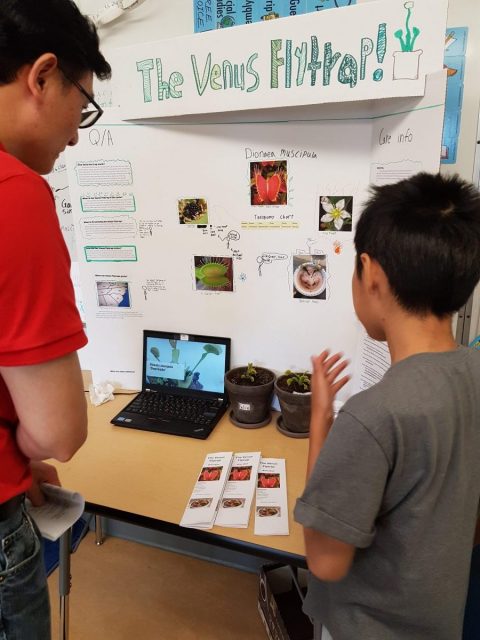
Independent project not only allows everyone to research something personally engaging to them, but also provides opportunities to learn project-management skills. Students will need to think ahead, find resources, document findings, and present their conclusions to the public in an interesting way. It is an exciting process that will be going on all during term three!

We have already talked about all of this in class, but here is a recap on the blog to refer to. We will be talking each week prior to presentation day about the mini goals to help keep us on track. I recommend using your agenda carefully to keep track of both unit and independent project (IP for short) work.

Independent Project Requirements:

  • Choose a topic that is personally engaging and important to you
  • Create questions to research using the wonderings board as a guide (in class)
  • Document your research, recording notes in your own words
  • Record resources and create a formal bibliography to show on presentation day
  • Use secondary resources that include online sites, books, and encyclopedias
  • Do primary research and document it in some way
  • Make a presentation to the public in an engaging, creative way (your choice)
  • Include some writing and something interactive as part of your presentation
  • Prepare some talking points on index cards prior to the presentation on June 10
  • Optional: Have a handout to distribute on presentation day

What is primary research? Here are some examples, and ask if you need help:

  • Do an experiment! Take pictures, record results, and write up your lab using the scientific method.
  • Do an interview with an expert. Create interview questions before you start, have Ms. D look them over, set up the interview, and record the results of the interview as part of your notes. Take a picture if possible!
  • Visit a location and have a new experience! Record your visit with pictures and notes. Include this information as part of your presentation.
  • Learn to do something for the first time! Learn through your research how to make or do something. Examples from past years — make an animation, create a micro controller, do a stop motion movie, make a painting, create a detailed model, or take care of a new pet! Document what you do with pictures and notes, then include this as part of your presentation.

What is required for the presentation?

  • Something visual, but it does not have to be a poster or trifold presentation. I tell everyone that doing a poster is what we are most comfortable with, but I encourage students to get creative! Having a visual can include a model, an interactive display, a set up of an experiment, a game people can play, and/or something people can see and read on a visual background display like a piece of poster board or simple cardboard display. Unlike a science fair, a trifold is not required.
  • Some writing about your project provided on a handout, a simple display, etc.
  • A bibliography that is printed out in 12 size font, with a title and your name, displayed somewhere at your station in the classroom during the presentation.
  • Index cards with talking points to help you know what to say when adults ask you about your topic. Record the key ideas you would like people to walk away with when they leave your station.

What kinds of creative displays are allowed?

  • Be creative! Models, games, taste tests, experiments, cartoons, computer displays, etc.
  • Be engaging!  People won’t read a ton of writing on a trifold. They also don’t watch long PowerPoint presentations. So, look for things people can DO and EXPERIENCE, or things in your display that you can actively talk about.
  • You can use technology. One laptop or one iPad is available to you, and we will have a sign up before the day of the presentation so you can tell Ms. D what you need and arrangements are made ahead of time. You must tell Ms. D BEFORE the day of the presentation what you need.
  • You can have handouts. Handouts for photocopying must be given to Ms. D the Friday before the presentation on June 5th. I will make a limited number of handouts for you.
  • Art and building supplies are available.  I have some cardboard, building  materials, and art supplies. Please don’t wait until the last week to ask for what you need. Also, I don’t have trifolds for people. If you want one, you will need to purchase at a Dollar Store, but it is NOT required. I can provide simple poster board
  • Be careful of size — we have 23/24 people presenting in the classroom, so we can’t all have our own table. Bigger doesn’t necessarily mean better. Just run your idea by Ms. D so we know it will fit in the classroom space.
  • Avoid water/liquids. We have had trouble in the past with anything liquid, because lots of people are in the space and water can spill. If you absolutely must have water, please tell Ms. D ahead of time.
  • Bring what you need for the day of the presentation! Serving food? Bring utensils and napkins. Need a special tool? Ask ahead of time or bring your own on the day of.
  • Need something printed? Last day to give me anything to be printed is June 5th, Friday. We can’t be dealing with the printer at the last minute. Thank you!

I am having trouble finding resources. What should I do?

  • Use communication and self-advocacy skills to speak up and let Ms. D know you need help. Ms. D will help you get on track, help you find websites, or brainstorm ways to expand your research.
  • Ms. Ho, our school librarian, is looking for resources that will be sent from high school libraries throughout the District. These books will be available in the classroom only, and Ms. D will provide you with time to use them and take notes.
  • Ms. D has sent out the topics to our Advanced Learning Team for any contacts and ideas.
  • Ask your parents for help, as well, because they may have knowledge of the topic, or be able to refer you to someone for help.
  • Go to the public library — preferably the main one — and ask the research librarian for help. Don’t limit yourself to the kids section, as some of what you need may be in the adult non-fiction area. You will need guidance, so ask for help. That’s what the research librarian is for!

How can I stay on track with this project?

  • When you receive time in class to do projects, please use the time wisely!
  • Use strategies such as taking breaks, using alternative spaces to work so you can avoid distractions, and mindful breathing — anything that helps you to stay focused during work periods.
  • Use your agenda and a calendar. Make mini goals for each week and check in to see that you have accomplished them.
  • Use the handouts Ms. D will give you, such as the bibliography example, so making a bibliography isn’t difficult for you. Ask for help if you need it!
  • Set aside at least 30 minutes after school, preferably before 8PM so you are not too tired to do work, to catch up on anything for the project.
  • Communicate calmly with Ms. D and/or your parents when you need to ask for help, feel stressed or overwhelmed, or when we ask you if you are okay.
  • It is okay for people to check in with you, because we are all here as your supports! Just because we call it an independent project means you need to do everything by yourself. 🙂

I hope this helps! There will be a rubric to come that helps us evaluate ourselves and how we used both curricular and core competencies during this learning experience. Remember, it is a learning experience! More important than the final product is the learning process. Focus on what you are learning, even when things don’t go as expected.

I look forward to working with all of you! See you on June 10th for the presentation of independent projects, from 12-2 PM.

Thank you,

Ms. D