Accessing Office 365 – Microsoft Team
- Open a web browser like Google Chrome or download the app (NOT SAFARI). Go to https://portal.office.com or https://teams.microsoft.com/
- Login using this format:
- Username: pupil#@edu.burnabyschools.ca(The same ID used to login to school computers. Example 1444892@edu.burnabyschools.ca)
Password: your SD41 school password
Note: This information should be on the front page of your planner. If you do not have it written/memorized, please email me.
- Username: pupil#@edu.burnabyschools.ca(The same ID used to login to school computers. Example 1444892@edu.burnabyschools.ca)
- Select the “Teams” icon (shown below)
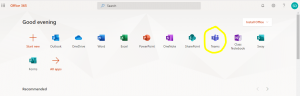
- You now have access to
O365-Div. 7 – Ms. Daneshwand (2021-22)
- Reply a school-appropriate greeting under my post on the main channel so I know you got to this point.
- Assignments and quizzes are accessible in the “Assignments” page
- Remember that this is a school-based chat. Please do not play with settings — do not add any photos/comments to your profile. Remember to stay on task and appropriate.